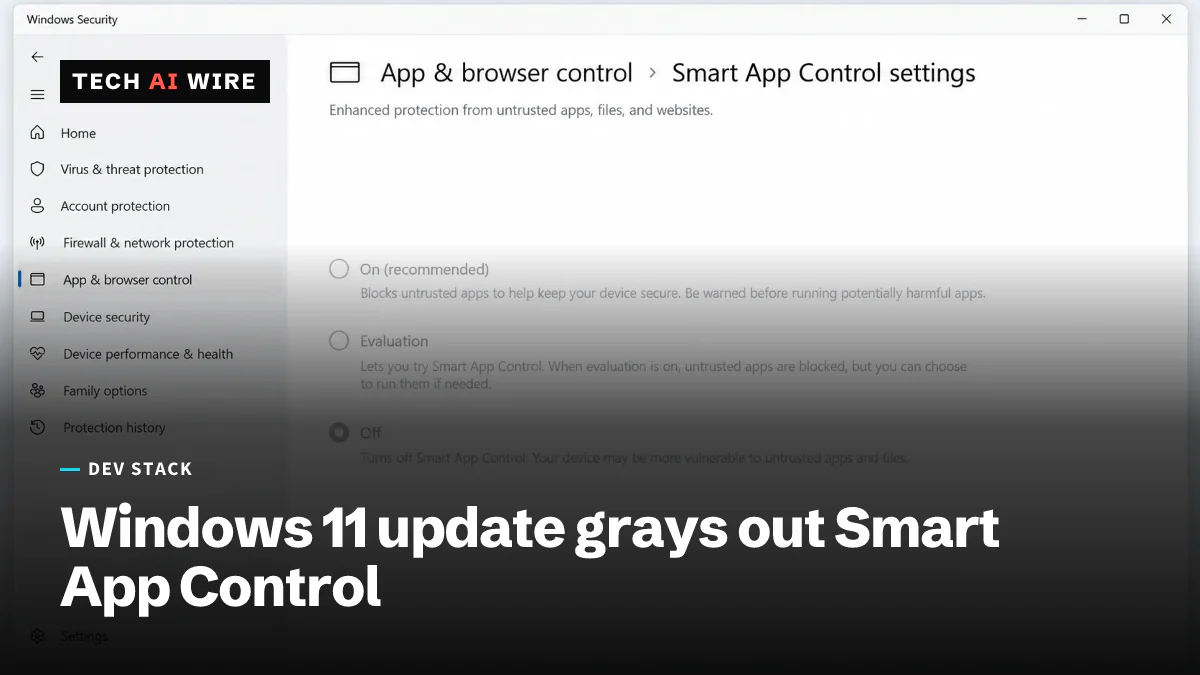
Windows 11 KB5127648 bug grays out Smart App Control
After Windows 11's October update KB5127648, some PCs cannot turn Smart App Control back on. Microsoft lists a registry workaround while it works on a fix.
3 min read
By the numbers
- October 13, 2026 Windows 11 security update
- KB5127648
- Windows 11 versions affected: 24H2, 25H2, 26H2
- 3
- known issues listed by Microsoft
- 3
Microsoft has confirmed that its October 2026 security update for Windows 11, KB5127648, can stop some PCs from turning Smart App Control back on. On affected machines, the switch in the Windows Security app is grayed out. Smart App Control is a Windows 11 feature that blocks apps Windows does not trust, so a PC that loses it runs with one less layer of protection.
The bug hits devices where the feature had been turned off before. "Devices where Smart App Control is already turned on are not affected and remain protected," Microsoft's advisory says, as BleepingComputer reported on October 16. There is no fix yet. Microsoft says it is working on one for an upcoming release.
Which PCs get the update
KB5127648 shipped on October 13, 2026, according to Microsoft's support page. It covers all editions of three Windows 11 versions:
| Windows 11 version | Build after the update |
|---|---|
| 26H2 | 26300.9711 |
| 25H2 | 26200.9711 |
| 24H2 | 26100.9711 |
It is also the last monthly update for Windows 11 24H2 Home and Pro. Those editions reached the end of servicing this month, and Microsoft's 26H2 release is the way forward for them.
The workarounds
Microsoft gives two temporary workarounds. The first adds two registry values. The registry is the database where Windows keeps its settings. Run these commands as an administrator, then restart:
reg add "HKLM\SYSTEM\CurrentControlSet\Policies\Microsoft\FeatureManagement\Overrides" /v 2883193997 /t REG_DWORD /d 1 /f
reg add "HKLM\SYSTEM\CurrentControlSet\Policies\Microsoft\FeatureManagement\Overrides" /v 2850574478 /t REG_DWORD /d 1 /f
The second is for IT teams that manage PCs through Group Policy, the Windows tool for pushing settings to many machines. They can install two Feature Preview packages, KB5074105 261015_19222 and 261015_19221. Then they set both policies to Enabled and restart. BleepingComputer describes both workarounds as aimed at enterprise-managed devices.
Two other known issues
Microsoft's page lists two more open problems with the update.
- Remote Desktop for non-admins. On hosts with Administrator protection turned on, Remote Desktop can fail for standard users with error 0xC000000D. The message reads "The token that was passed to the function is invalid." It started with update KB5124010 or later. The temporary workaround is to switch Administrator protection off.
- USB audio. Some USB Audio Class 1.0 devices fail or play no sound after the September 8, 2026 update. An out-of-band update on September 14, KB5129195, fixed 8-channel and 3D audio. Microsoft is still working on the rest.
What the update fixes
The update also fixes several bugs, Microsoft says. They include Explorer crashes and black screens in multi-user Azure Virtual Desktop setups. Always On VPN connections that stuck at "Connecting" after an earlier update now work. Fingerprint sign-in with Windows Hello failed on some PCs after a cold boot, and that is fixed too.
One change is a new default. NTLMv1 single sign-on now moves from Audit to Enforce when the BlockNtlmv1SSO setting is not set. NTLMv1 is an old Windows sign-in protocol.
It is part of this month's large security release. Microsoft's October Patch Tuesday fixed more than 1,400 flaws.
What this means for developers
- Check before you assume protection. If your PCs had Smart App Control off, open Windows Security after the update and see whether the switch still works. A grayed-out switch means the bug has hit that machine.
- Do not skip the update. The bug only affects turning the feature back on. The security fixes in KB5127648 still matter, and machines that already had the feature on are unaffected.
- Test the registry fix on one machine first. It changes system policy values. Try it on a test PC, confirm the switch works after a restart, then roll it out.
- Watch for NTLMv1 breakage. The new Enforce default can block old apps that still sign in with NTLMv1. If a legacy app fails after the update, check this setting before anything else.
- Track the next update. Microsoft says a fix is coming in an upcoming release. Remove the workaround once it ships, so your PCs return to normal settings.
Sources
- KB5127648 Windows security update may break Smart App Control - BleepingComputer
- October 13, 2026 - KB5127648 (OS Builds 26100.9711, 26200.9711 and 26300.9711) - Microsoft Support
Related articles
Microsoft's October Patch Tuesday fixes a record 1,400+ flaws
Microsoft's October 2026 updates fix more than 1,400 flaws, a record. One Windows Shell bug is already exploited, and two more were public before the fix.
Microsoft Execution Containers for AI agents reach GA
Microsoft Execution Containers, generally available since October 7, wall AI agents off from files and networks on Windows 11, macOS and Linux.
Rust is now a tier-1 language at Microsoft
Microsoft made Rust a tier-1 language beside C++, C# and TypeScript. More than 100 of its repositories now build Rust code.
The weekly digest
One email every Friday with the week's top stories from all six desks: AI, dev tools, coding, the tech industry, startups and what's next. Free, no spam.