Google AI Edge Foresight takes meeting notes offline
Google AI Edge Foresight, an experimental Mac app, turns shorthand into meeting notes on-device with Gemma 4 and the 740M-parameter EmbeddingGemma 2.
4 min read
By the numbers
- parameters in EmbeddingGemma 2, the search model
- 740M
- active memory for text-only search, per Google
- 191MB
- active memory for the full multimodal model
- 567MB
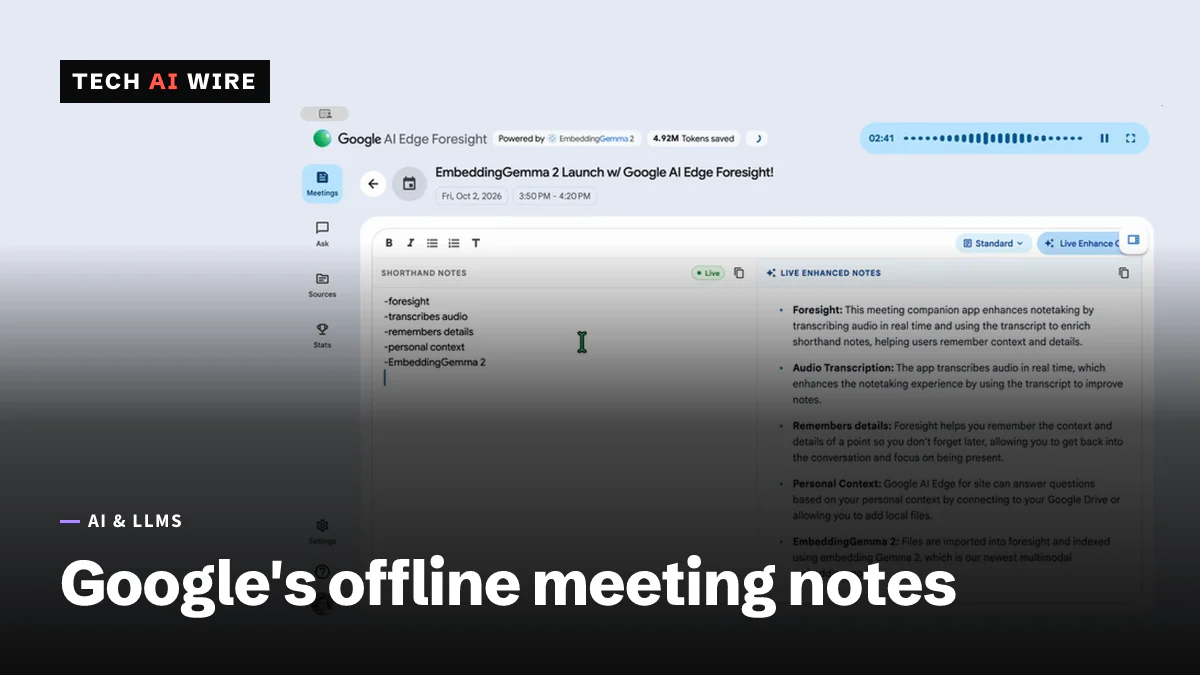
Google has released AI Edge Foresight, an experimental Mac app that takes meeting notes without sending anything to the cloud. It listens to a meeting, transcribes it on the device and turns a user's rough shorthand into full notes. The app arrived on October 6, 2026, alongside Google's EmbeddingGemma 2 model, and shows how much AI work an ordinary laptop can now do alone.
What Foresight does
Google's developer blog calls Foresight "an experimental app that brings a context-aware meeting companion directly to your device." It works during video calls and in-person meetings.
The main idea is shorthand. While the meeting runs, the user jots quick bullets "for things you want to remember," as 9to5Google puts it. The app listens in the background and expands those bullets into polished notes from the meeting transcript. TechCrunch describes a split screen, with the user's shorthand on one side and the AI's notes on the other. Users can still type their own notes during transcription.
Foresight also answers questions. A Live Assistance mode listens for questions raised in the meeting and answers them automatically, according to 9to5Google. A chat feature lets users ask about their own material afterward.
It reads your files too
Users can point Foresight at project folders, reference materials, diagrams and their calendar, 9to5Google reports. It can also draw on Google Drive. TechCrunch lists PDFs, Google Docs, Microsoft Office files, plain text, Markdown and web bookmarks as knowledge sources. When something said in a meeting relates to those files, the app can surface the answer in real time.
Google's blog says the app supports cross-modal retrieval. In plain terms, a user can search images, documents, transcripts and notes with one everyday question.
The on-device stack
Two Google models do the work, according to the blog: Gemma 4 and EmbeddingGemma 2. Gemma 4 is Google's family of open models, and TechCrunch says a Gemma 4-powered assistant handles the chat.
EmbeddingGemma 2 handles search. An embedding model turns text, images or audio into lists of numbers that capture meaning. Items with similar meaning get similar numbers, so the app can find a related document even when it uses different words.
EmbeddingGemma 2 has 740 million parameters and is built on the Gemma 4 architecture under the Apache 2.0 license, 9to5Google reports. Google says it runs in about 191MB of active memory with text-only weights. The full multimodal model needs about 567MB, measured on a Pixel 11 Pro. That small size is why EmbeddingGemma 2 can run multimodal search on a phone.
| Detail | What the sources say |
|---|---|
| Platform | Mac only, optimized for Apple Silicon (TechCrunch, citing Google's FAQ) |
| Models | Gemma 4 and EmbeddingGemma 2 (Google) |
| Network | Works fully offline (Google, TechCrunch) |
| Cost | No cloud subscription cost (Google) |
| Status | Experimental (Google) |
| Download | developers.google.com/edge/foresight |
Google's blog says "your sensitive data never leaves your device." None of the sources gives a minimum macOS version or memory requirement for the Mac.
Why Google built it
TechCrunch frames Foresight as a rival to Granola, a popular AI note-taker, and the two share a split-screen layout. But TechCrunch suggests the app mainly showcases Google's offline Gemma models. It also speculates that Google could later ship a cloud-based note-taker inside its Gemini apps. The same Google team released an offline AI dictation app in April, TechCrunch reports.
The market is crowded. Wispr and Calendly released their own note-takers in recent months, and Superhuman bought Fathom in September, according to TechCrunch.
What this means for developers
Foresight is a standalone app, but it is also a working reference design for local AI.
- Treat it as a pattern to copy. A small embedding model for search plus a larger model for answers is the standard retrieval setup. Foresight shows that setup running on a laptop with no server.
- Check the memory budget. At about 191MB for text and 567MB for multimodal, EmbeddingGemma 2 fits beside other apps. The Gemma 4 model's footprint is not stated, so test on your own Mac before planning around it.
- Consider it where cloud tools are banned. Some teams cannot send meeting audio to outside services. An offline note-taker avoids that problem, though a security review of any experimental app still makes sense.
- Expect rough edges. Google labels Foresight experimental. Do not make it the only record of an important meeting yet.
- Compare it with your current tool. If you pay for a cloud note-taker, run both on the same meeting and compare the notes side by side.
Sources
Related articles
EmbeddingGemma 2 puts multimodal search on a phone
Google DeepMind's EmbeddingGemma 2 maps text, code, images, video and audio into one vector space with 740M parameters. Text-only use needs about 191 MB of RAM.
SynthID's image watermark carries a 64-bit ID field
A research paper shows SynthID's image watermark carries a 64-bit database-ID field, though Google says it tracks no individual users.

Google Cloud's Gemini agent can route work to Claude
Google Cloud unveiled the Gemini agent on October 8, a work agent in private preview that runs jobs on Gemini or Claude and can keep working for hours or days.
The weekly digest
One email every Friday with the week's top stories from all six desks: AI, dev tools, coding, the tech industry, startups and what's next. Free, no spam.