VS Code 1.136 adds Agent Merge to finish pull requests
VS Code 1.136 ships Agent Merge in preview. An agent answers review comments, fixes failing checks and resolves conflicts until a pull request is ready.
3 min read
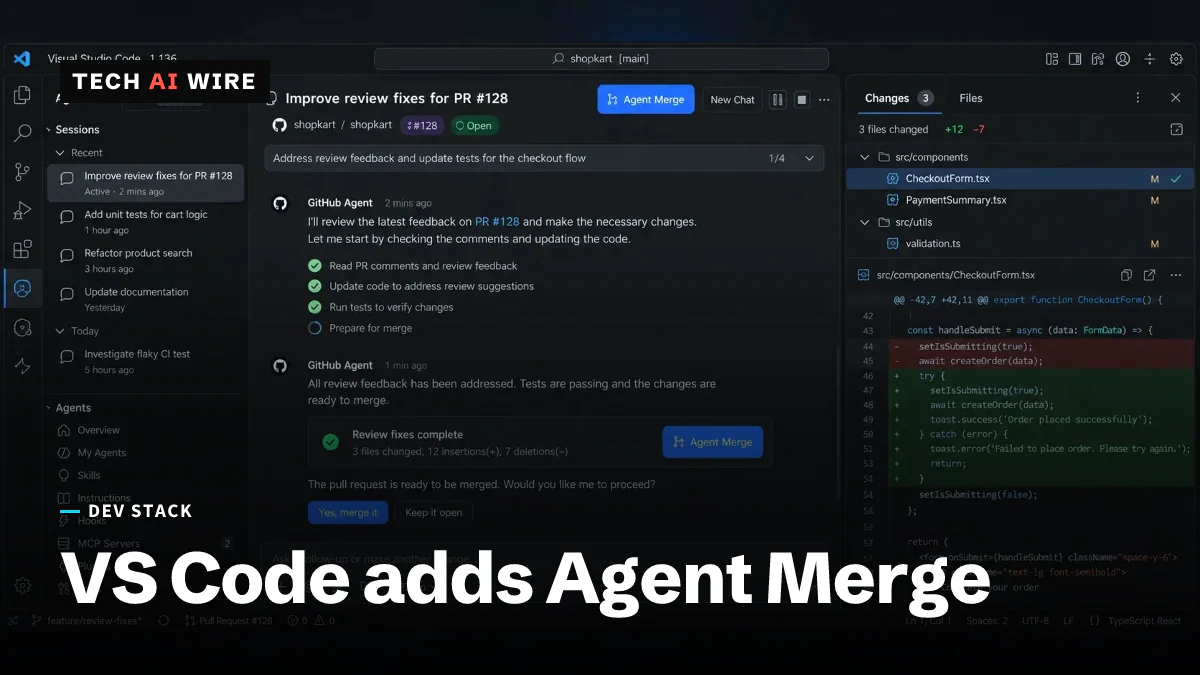
Visual Studio Code 1.136 adds a preview feature called Agent Merge. It hands an open pull request to an AI agent, which then answers review comments, fixes failing checks and resolves merge conflicts until the request is ready. Microsoft dated the release notes September 2, 2026.
A pull request is a proposed code change waiting for review. Getting one merged often means a slow loop of comments, edits and re-run tests. Agent Merge aims at that loop, not at writing the code in the first place.
What Agent Merge actually does
Microsoft's release notes describe the feature in one line. "Agent Merge helps you take a pull request across the finish line," they say. "It asks an agent to address review feedback, fix failed checks and merge conflicts, and rerun workflows."
Four separate jobs sit inside that sentence.
| Job | What the agent does |
|---|---|
| Review feedback | Reads reviewer comments and edits the code |
| Failed checks | Diagnoses a failing test or lint run and fixes it |
| Merge conflicts | Resolves conflicts against the target branch |
| Workflows | Re-runs the checks, then repeats the cycle |
The agent does not merge anything by itself. Approval stays with a person. The release notes do not say which git hosting providers are supported.
How to turn it on
Agent Merge is off by default. Microsoft gates it behind a setting named chat.agentMerge.enabled.
Switching that setting on does not start anything either. You still enable the feature one session at a time. There are three ways in: the Agent Merge button, the command "Enable Agent Merge for Active Session", or the Agents window.
That per-session design is worth noticing. This is not a background service watching your repository and pushing commits.
The rest of the agent changes in 1.136
Agent Merge arrives alongside several smaller changes to how sessions work.
- Multi-root workspace support, marked experimental, for both Copilot and Claude agent sessions
- Workspace resolution that lets an agent identify a project by name
- A session hierarchy that shows related chats as children of a parent session
- Notifications when a session is waiting on your approval
- Readable breadcrumbs for files a session created
- A redesigned session input with the controls gathered in one place
The chat surface changed too. The release adds experimental chat backgrounds, dictation controls for enterprise administrators, and screen reader improvements.
What this means for developers
The interesting shift here is not code generation. It is that the agent now operates your continuous integration and your pull request queue. Those are shared systems, and the blast radius is wider than an editor buffer.
Watch the conflict resolution most closely. Of the four jobs, it is the one where a wrong answer still compiles and still passes tests. An agent can resolve a conflict by quietly dropping somebody else's change, and nothing downstream will complain. Read those diffs line by line, the way you would read a rebase you did not perform.
Budget is the second thing to check. The loop reruns workflows until checks pass, so a flaky test becomes an agent retrying against a test that fails at random. If your CI bills by the minute, put a cap somewhere before you turn this on. A synthetic worked example, published by Telemetry's creator on DuckDB's discussion board, puts cost per accepted task at $0.75 when failed attempts count and $0.30 when they do not. We covered how GitHub started billing Copilot code review on Azure Repos, and the same question applies to anything that reruns pipelines on your behalf.
Your real controls are unchanged, and they are not in this settings file. Branch protection rules, required reviewers and required status checks still decide what can land. The setting governs whether an agent may push more commits to the branch. It does not govern what your repository accepts.
Treat the preview label seriously for now. Enable it on a branch you own, on a pull request that is already close to green, and read every commit it produces. Research on coding agents found they disagree about which tool to reach for far more often than their marketing suggests. An agent that is confident and wrong about a merge conflict is the failure mode to plan around.
Sources
- Visual Studio Code September 2026 (version 1.136) - Visual Studio Code
- vscode release 1.136.1 - GitHub
Related articles
VS Code 1.141 sandboxes AI agents on Windows, macOS, Linux
VS Code 1.141 sandboxes AI agents on Windows, macOS and Linux, shows agent sessions in a grid and picks up Codex and Copilot chats started in other apps.
Replit CEO says it dropped Anthropic; insider disputes it
Replit CEO Amjad Masad said on October 16, 2026 that Replit no longer works with Anthropic, citing cost and performance. A source says the deal stands.
Atlassian puts OpenAI models inside Rovo and Jira
Atlassian and OpenAI expanded their partnership: OpenAI models now power Rovo, and ChatGPT and Codex reach Jira through an MCP server that takes 15M calls a day.
The weekly digest
One email every Friday with the week's top stories from all six desks: AI, dev tools, coding, the tech industry, startups and what's next. Free, no spam.