Raspberry Pi OS adds an icon dock and app launcher
A swaybg option trims memory on boards under 2GB, and the labwc desktop gains an optional icon dock, a search-driven launcher and a Control Centre.
3 min read
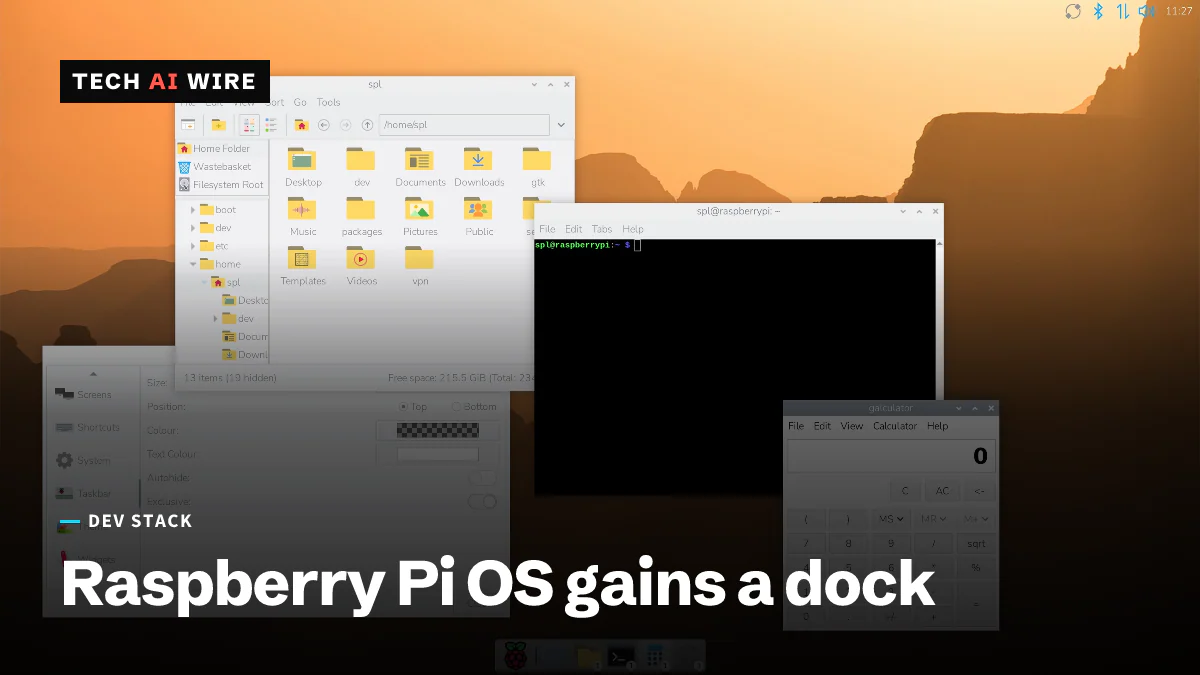
Raspberry Pi has reworked the desktop in Raspberry Pi OS, adding an optional icon dock, a full-screen application launcher and a new Control Centre. The project announced the changes on September 15, 2026, and Phoronix reports they arrive with the latest OS image and package updates.
The framing matters as much as the features. "These are purely intended to give users who want a more up-to-date desktop experience the option to have one if they want it," the announcement says. Nothing here is forced on an existing install.
What is new on the desktop
The dock is the headline. Icons can be rearranged by dragging, sorted alphabetically, and grouped into menu categories, and there is a search box for finding an application by name.
The application launcher is a separate change. It replaces the old main menu widget with a launcher screen, which is the pattern phones and macOS have used for years.
The task list learned to count. Application icons now carry an overlay showing how many windows that application has open, and a right-click menu manages those windows individually.
Screenshots changed too. Taking one now opens a dialog offering to open the image in an editor or copy it to the clipboard. Alt and PrtScrn together capture a selected area instead of the whole screen.
All of this runs on Wayland, using the labwc window manager. That is worth noting if you maintain software that assumed X11 on a Pi.
The Control Centre and its presets
Settings for the new pieces live in one place. The Control Centre is organized into pages.
| Page | What it controls |
|---|---|
| Dock | Color, position and icon size |
| Widgets | Desktop widgets |
| Defaults | Three preset styles: Dock, Taskbar and Dock, or Taskbar |
| Shortcuts | Keyboard shortcuts |
| Desktop | Desktop appearance |
The Defaults page is the one to reach for first. It lets you pick the new dock, the old taskbar, or both together, which means the whole redesign can be switched off in one click.
A lighter option for small boards
The change with the clearest engineering reason is also the least visible. The desktop background is normally drawn by the file manager. The update adds an option to hand that job to swaybg, a small dedicated program, which uses less memory.
Raspberry Pi recommends it for systems with less than 2GB of RAM. That covers a lot of boards still in service, and it is the kind of trade that matters when the desktop is competing with your own process for memory.
What this means for developers
If you ship a desktop application for the Pi, test it against labwc on Wayland rather than against your memory of the old desktop. The dock, the launcher and the window-count overlays are all new surfaces your application appears in. An application that sets an unusual window type or title is where these break first.
If you build images or kiosks, read the Defaults page as a compatibility switch. A fleet that expects a taskbar at the bottom of the screen can keep one, and pinning that choice in your image is cheaper than retraining users or rewriting documentation.
The swaybg option deserves a real measurement on constrained boards. Less than 2GB of RAM is the case Raspberry Pi names. If your workload is memory-bound on such a board, freeing the file manager from drawing the wallpaper is free headroom. Measure with your own process running, not on an idle desktop, because an idle desktop is not the situation you care about.
The wider signal is about the Pi growing up as a desktop rather than only as a board. A dock, a launcher and a settings app are the furniture of a general-purpose computer. Raspberry Pi shipping them as options, with the old layout one click away, is a reasonable way to move without breaking the installed base.
Sources
Related articles
Snapdragon X2 gets an early Linux developer preview
Qualcomm's Snapdragon X2 Linux preview arrived on September 23, 2026, with official kernel support due around November 2026.
FEX-Emu breaks down the cost of x86 TSO on Arm
Emulating x86 memory rules on Arm drops unaligned throughput to 8.5% of baseline. Write-combine stores are reported 816 times worse.
Ubuntu 26.10 will ship a pre-release Linux 7.3
Ubuntu 26.10 releases on October 15, three days before Linux 7.3 is due to be declared stable. The ISO ships a release candidate.
The weekly digest
One email every Friday with the week's top stories from all six desks: AI, dev tools, coding, the tech industry, startups and what's next. Free, no spam.