GitHub stacked pull requests are now generally available
GitHub made stacked pull requests generally available on October 6, 2026, on every github.com plan, with stack-aware merge queues and the gh stack CLI.
4 min read
By the numbers
- more merged code in repos using stacks, per GitHub
- 9%
- faster time to merge, per GitHub
- 5%
- minimum GitHub CLI version, per CCLeaks
- 2.90.0
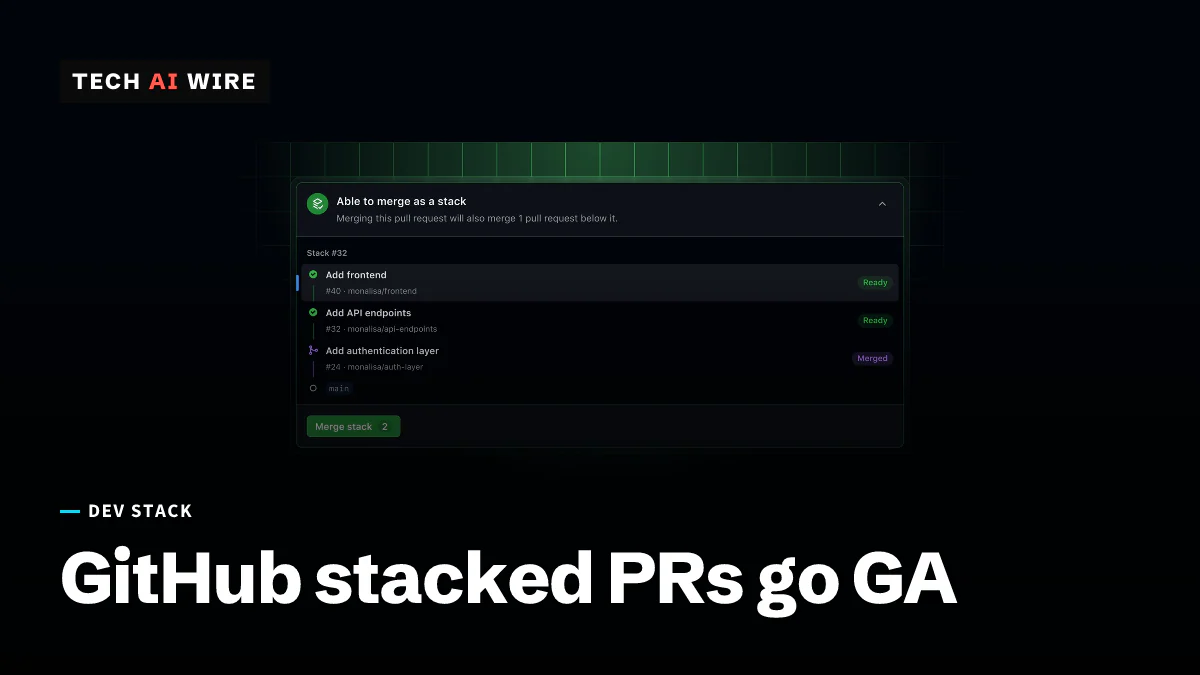
GitHub made stacked pull requests generally available on October 6, 2026, on every github.com plan. A stack lets a developer split one large change into a chain of small pull requests that are reviewed one at a time, then merged together. The feature had been in public preview since July 30, and GitHub says teams using it already merge more code.
What a stacked pull request is
A pull request (PR) asks to merge one branch of code into another. Large PRs are slow to review, because a reviewer has to understand everything at once.
A stack breaks that work into layers. Each PR targets the branch below it, so each one shows only its own slice of the changes. The bottom PR targets the main branch, often called trunk. According to GitHub's changelog, each layer gets its own reviews and checks before the layers land together.
Merging works from the bottom up. CCLeaks, which published a setup guide on October 8, explains that merging one PR also lands every unmerged PR below it. Merging the top PR merges the whole stack. Branch rules still apply to every layer, including required reviews, status checks and code owners.
What changed with general availability
The October 6 changelog lists these changes since the preview:
| Change | What it does |
|---|---|
| Approvals survive rebases | Rebasing a stack keeps approvals on unchanged code, even in repos that dismiss stale approvals |
| Signed commits | Commits rewritten during a stack rebase stay signed and keep their original author |
| Merge queue | A stack enters the merge queue as one group and lands together |
| Merge commits | With the merge commit method, each PR in the stack gets its own merge commit |
| Deleted base branch | The stack is retargeted instead of its bottom PR being closed |
| Bypass merges | Users who can bypass repository rules can merge the lowest unmerged PR |
Auto-merge for stacks is still rolling out "over the next few weeks," GitHub says. The PR header now shows stack details, and the timeline records when a PR joins or leaves a stack. Webhooks gain a stacked action on the pull_request event. GitHub Enterprise Server, the self-hosted edition, gets stacks "in an upcoming release."
The numbers GitHub reports
GitHub says repositories using stacks merged 9% more code than their peers. It also reports a 5% improvement in time to merge. These are GitHub's own figures, and the changelog does not explain how it picked the comparison group.
Early users sound pleased. "It took one merge with GitHub's Stacked PRs for me to conclude that it's amazing," Charlie Marsh, the founder of Astral, is quoted as saying in the changelog. In the July preview post, Next.js lead Tim Neutkens of Vercel said: "We've been using GitHub stacked PRs for Next.js for the past few months."
How to start a stack
Stacks are driven by gh stack, an extension for the GitHub CLI, GitHub's command-line tool. CCLeaks lists GitHub CLI 2.90.0 or later and Git 2.20 or later as requirements. The GA release adds support for Git worktrees, which let one repository keep several branches checked out in separate folders.
The basic flow, per the CCLeaks guide:
- Install the extension with
gh extension install github/gh-stack. - Run
gh stack initto start a stack, thengh stack add <branch>for each layer. - Run
gh stack submitto open the PRs, andgh stack viewto see the chain. - Run
gh stack rebasewhen the base branch moves.
The July preview post says stacks can also be built on github.com, in the GitHub mobile app, or by a coding agent such as GitHub Copilot using the gh-stack skill. In the web view, Shift+J and Shift+K move between the PRs in a stack.
Limits to know first
The feature has hard edges. CCLeaks lists these:
- One repository only. Every branch must live in the same repository, so stacks across forks do not work.
- Straight lines only. A stack cannot branch; one PR cannot have two children.
- No GitHub Desktop. The desktop app does not support stacks.
- Old merge endpoints fail. Legacy PR merge API endpoints cannot merge a stack.
- Bigger queue groups. A stack's merge-queue group can exceed the configured maximum size by up to 50%. Ejecting one PR also removes every PR above it.
What this means for developers
Teams that split big work into dependent branches by hand now get a built-in flow. Before switching, check a few things.
- Check your automation. Bots that merge through older API endpoints will fail on stacks. CCLeaks says stack data reaches GitHub Actions as
github.event.pull_request.stack, and the REST API's stack field is null for single PRs. Update merge bots to read it. - Review merge queue limits. If your queue caps group size to protect CI capacity, a stack can push a group up to 50% past that cap.
- Expect fork contributors to wait. Open-source projects that accept changes from forks cannot stack those PRs yet.
- Plan Enterprise Server upgrades later. Self-hosted customers have no date, only "an upcoming release."
- Try it on one large change. A refactor that touches many files is a natural first test. Split it into three or four layers and see whether reviews come back faster.
The 9% figure is GitHub's claim about its own product. Your own review times, before and after, are the number worth tracking.
Sources
- Stacked pull requests generally available - GitHub Changelog
- Stacked pull requests are now in public preview - GitHub Changelog
- How to Use GitHub Stacked Pull Requests: Setup, Merging and Limits - CCLeaks
Related articles
VS Code 1.141 sandboxes AI agents on Windows, macOS, Linux
VS Code 1.141 sandboxes AI agents on Windows, macOS and Linux, shows agent sessions in a grid and picks up Codex and Copilot chats started in other apps.

Claude for Google Workspace opens in public beta
Anthropic's Claude now works in a sidebar inside Google Docs, Sheets and Slides, in public beta on all paid plans, with edits approved one by one by default.

Atlassian puts OpenAI models inside Rovo and Jira
Atlassian and OpenAI expanded their partnership: OpenAI models now power Rovo, and ChatGPT and Codex reach Jira through an MCP server that takes 15M calls a day.
The weekly digest
One email every Friday with the week's top stories from all six desks: AI, dev tools, coding, the tech industry, startups and what's next. Free, no spam.