LiteLLM 1.107.0 hijacked to ship a credential stealer
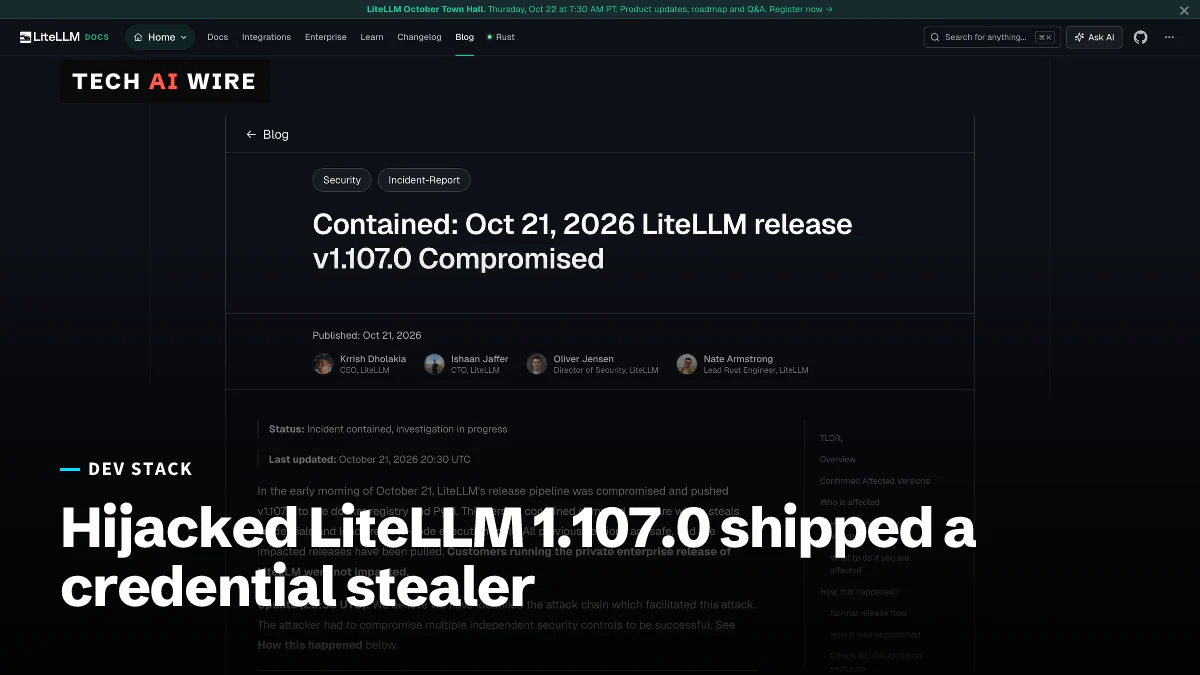
Malicious LiteLLM 1.107.0 wheels were live on PyPI from 11:39 to 13:23 UTC on October 21, 2026, and ran a credential stealer at every Python start.
3 min read
By the numbers
- PyPI wheels carried the malware
- 7
- UTC window the wheels were on PyPI
- 11:39-13:23
- the clean version to reinstall
- 1.106.2
Attackers pushed a malicious LiteLLM 1.107.0 to PyPI and Docker on October 21, 2026, after taking over the project's release pipeline. Any machine that installed it ran a credential stealer every time Python started. LiteLLM tells affected teams to assume their secrets were stolen and rotate them.
LiteLLM is an open-source tool that sits between apps and AI model providers. Its proxy server stores provider API keys, which makes it a valuable target.
What was published, and for how long
The LiteLLM incident report lists every affected artifact. The official v1.107.0 source tag on GitHub is clean. The release was built from a lookalike repository, Berri-AI/litellm, which StepSecurity says carried ten attacker commits.
| Artifact | Affected | Window (UTC, October 21) |
|---|---|---|
| PyPI | All seven litellm==1.107.0 wheels (macOS, Linux, musl Linux, Windows) | 11:39 to 13:23 |
| Docker Hub | v1.107.0, latest, main-latest, main-stable | 11:46 to 14:20 |
| GitHub Container Registry | Same tags for litellm, litellm-database, litellm-non_root | 11:46 to 13:51 |
Version 1.106.2 is clean, and so are the 1.107.0 release candidates, according to StepSecurity. LiteLLM says customers on its private enterprise release were not affected.
How the payload works
The malware did not wait for anyone to import LiteLLM. It added two startup hooks, cook.pth and sitecustomize.py. Python runs both whenever it starts in that environment, even when the command is just pip.
The first payload is a stealer that calls itself "privcollect," StepSecurity reports. It gathers cloud tokens, private keys, AI tool credential files, browser data and environment variables. It also takes saved LiteLLM proxy credentials. The data is encrypted and sent to litellm.dev, a domain registered on October 13.
The second payload is a loader that runs as a hidden background process. Every hour it reads a hostname from a file on GitHub, downloads code from that host and runs it. The GitHub account behind that file has been deleted, but infected machines keep checking the same address.
How the attackers got in
The attack ran through three engineers' GitHub accounts, LiteLLM's director of security, Oliver Jensen, told The Hacker News. One credential switched off branch protection, another approved the production release, and a third deleted the workflow records.
LiteLLM's 20:30 UTC update says it believes the attacker took GitHub CLI tokens from logs. The logs belonged to an internal LiteLLM deployment that was reachable from the internet. The company notes that Claude Code may include a user's GitHub CLI token in a response body, which ends up in logs when those bodies are recorded. Earlier, Jensen had said the method was not yet identified.
The same day, GitHub opened a public preview of expiring GitHub CLI tokens. The GitHub changelog says a leaked token then "becomes unusable within hours instead of lasting indefinitely."
What this means for developers
If you run LiteLLM, check today, and do it in the order LiteLLM gives.
- Do not start with
pip install. The startup hooks run again on every Python start. First find and stop the process holding/tmp/remote_code_loader.lock. - Remove the hooks, then reinstall. Delete
cook.pth,cook.pyandsitecustomize.pyfromsite-packages. Installlitellm==1.106.2, or better, rebuild the environment or image from scratch. - Assume the secrets are gone. LiteLLM says that if 1.107.0 ever ran on a host with outbound internet access, the theft should be assumed to have worked. Rotate the provider keys stored in the proxy, its master and virtual keys, the database password and the machine's cloud role.
- Pin by digest. Tags like
latestpointed at the bad image for over two hours. Pin images by digest and packages by hash. - Shorten your own tokens. Turn on expiring GitHub CLI tokens with
gh auth login --expiring, available from gh 2.103.0. Keep tokens out of logged request and response bodies.
This is LiteLLM's second hijacked release this year, after versions 1.82.7 and 1.82.8 in March. Stored provider keys were also the prize in OpenCode Console breach exposes stored AI provider keys last week.
Sources
- Contained: Oct 21, 2026 LiteLLM release v1.107.0 Compromised - LiteLLM
- LiteLLM Compromised in Supply Chain Attack Delivering Credential Stealer and Backdoor - The Hacker News
- litellm 1.107.0 Compromised on PyPI: Backdoored Wheels Drop a Credential Stealer and an Hourly Remote Code Loader - StepSecurity
- GitHub CLI: Opt in to expiring, auto-refreshing OAuth tokens - GitHub Changelog
Related articles
SAP Cloud SDK for Python bug can leak OAuth2 secrets
A CVSS 10.0 flaw in SAP Cloud SDK for Python lets attackers redirect OAuth2 token requests and steal app secrets. Version 0.45.2 and later fix it.
SourceHut build log XSS let attackers take over accounts
A crafted build log could run script in a SourceHut user's browser. ansi2html 1.9.4 fixes the bug, CVE-2026-92973, which hit versions 1.7.0 to 1.9.3.
Chrome moves to a two-week release cadence
Chrome 153 starts a two-week milestone cycle, down from four. Google says Chrome 149 and 150 alone fixed 1,072 security bugs as LLMs find flaws at scale.
The weekly digest
One email every Friday with the week's top stories from all six desks: AI, dev tools, coding, the tech industry, startups and what's next. Free, no spam.